


Just got a new Xbox and want to jump into a game with friends? You’re probably asking a very common question: “Do I need to buy Xbox Game Pass to play online?” If you’ve hit a screen asking for a subscription, it’s easy to assume the answer is always yes. But you might be able to save some money. To find more, check on ufac4
The best news is that for a huge number of the most popular games on the console, you do not need any subscription to play online. The rule is simple: if a game is free to download, playing it online is also free. This means if you’re wondering if you can play Warzone online without an Xbox subscription, the answer is a definite yes. In practice, this covers many of the world’s biggest titles.
Here is a short list of popular Xbox free-to-play online games:
- Fortnite
- Call of Duty: Warzone
- Apex Legends
- Rocket League
- Roblox
- Fall Guys
- Overwatch 2
To play any of these, all you need to do is download them from the Microsoft Store on your Xbox. As long as you have an internet connection, you are ready to play online with friends, no subscription required. Now, what about the games you have to buy, like Minecraft or Madden? That’s where things change.
The Rule for Paid Games: What You Need for Madden, Minecraft, and Call of Duty
That free-to-play exception is great, but what about the games you actually purchase? For the vast majority of titles you buy on a disc or download from the store—blockbusters like Call of Duty: Modern Warfare III, sports games like EA Sports FC 24, or creative worlds like Minecraft—the rules are different. If you want to play with or against other people online in these games, you will need a subscription.
Think of it as the ticket required to enter the online stadium. While you own the game itself, accessing the live, multiplayer part of it requires an online pass. This has been the standard for console gaming for many years, and it’s what allows you to connect with millions of other players.
The essential subscription you need for this is called Xbox Game Pass Core. This is the foundational plan designed specifically to unlock online multiplayer. If your goal is simply to get online and play the games you’ve already bought, this is the subscription you’re looking for.
Now, if you’ve been around Xbox for a while, the name “Game Pass Core” might be new. Don’t worry—you haven’t missed anything complicated. This service is simply the new name for what used to be called Xbox Live Gold. Microsoft just updated the name and added a few perks, but its main job remains the same: getting you online.
What Does Xbox Game Pass Core Actually Get You?
While unlocking online multiplayer is Game Pass Core’s main job, the subscription offers a bit more value than just an online pass. For its monthly price of $9.99, it’s designed to be the essential, budget-friendly package that covers the basics and throws in a couple of nice bonuses.
Thinking of it only as an online key means you might miss out on its other perks. At its heart, Game Pass Core gives you three distinct benefits:
- Online Multiplayer: As we’ve covered, this is your ticket to play paid games like Madden and Call of Duty online with friends.
- A Library of Games: Subscribers get immediate access to a curated collection of over 25 high-quality games to download and play, including titles like Halo 5: Guardians and Gears 5. Think of it as a small, rotating Netflix library for games, included with your subscription.
- Member Discounts: You get exclusive discounts when buying certain digital games and add-ons from the Xbox Store, which can save you money in the long run.
Ultimately, Game Pass Core is the most straightforward and cheapest way to get your console online for multiplayer gaming. It ensures you have the essentials covered while providing a handful of excellent games to play right away without any extra purchases. But what if you want more than just a handful? That’s where the next level of Game Pass comes in.
The “All-in-One” Deal: Is Game Pass Ultimate a Better Choice?
Game Pass Core covers the essentials, but many players find they want more than just a small collection of games. If you’re looking for the complete Xbox experience without juggling multiple subscriptions, this is where Xbox Game Pass Ultimate steps in. Think of it not just as an online pass, but as an all-access key to nearly everything Xbox has to offer, bundling all the best features into one monthly plan.
The biggest leap from Core to Ultimate is the game library. Instead of a handful of titles, you get a massive, rotating catalog of hundreds of games, from huge blockbusters to creative indie hits. It truly is like Netflix for gaming; if you see a game in the Ultimate library—like Starfield or Minecraft Legends—you can download and play the full version immediately as part of your membership.
Beyond the sheer size of the library, Ultimate has a killer feature: brand-new Xbox games are often added the very day they’re released. This means you could play huge titles like the next Halo or Forza Motorsport on launch day without paying the full $70 price. As an extra bonus, Ultimate also includes a subscription to EA Play, giving you yet another library of games like the Madden and Battlefield series at no extra cost.
So, while Game Pass Ultimate costs more per month, it bundles everything—online multiplayer, a huge game library, new releases, and EA Play—into one simple package. If you plan to play online and also want a steady stream of new games to try, it’s almost always the most cost-effective and convenient choice. But with all these options, there is one common mistake people make when just trying to get online.
The Mistake to Avoid: The One Game Pass That DOESN’T Let You Play Online
With all these options, it’s easy to make a common mistake. You might see a subscription simply called Xbox Game Pass for Console. This tier is designed for one thing only: to give you access to the large game library, just like Netflix gives you access to movies. It’s a great option if you only play single-player games and want a lot of variety, but it has a major catch that trips many people up.
The confusion arises because the standard “Game Pass for Console” subscription does not include the online multiplayer access that Game Pass Core provides. If you buy this plan, you can download hundreds of games, but you still won’t be able to hop into an online match of a paid game like Madden or Call of Duty. For beginners, this can be incredibly frustrating, as you’ve bought a “Game Pass” but still can’t play online with friends.
If you find yourself wanting both the big game library and online multiplayer, you could technically subscribe to Game Pass Core and Game Pass for Console separately. However, this is almost always the most complicated and expensive route. It’s far simpler and more affordable to just choose Game Pass Ultimate, which, as we saw, bundles everything together.
Core vs. Ultimate: A Simple Side-by-Side to Help You Choose
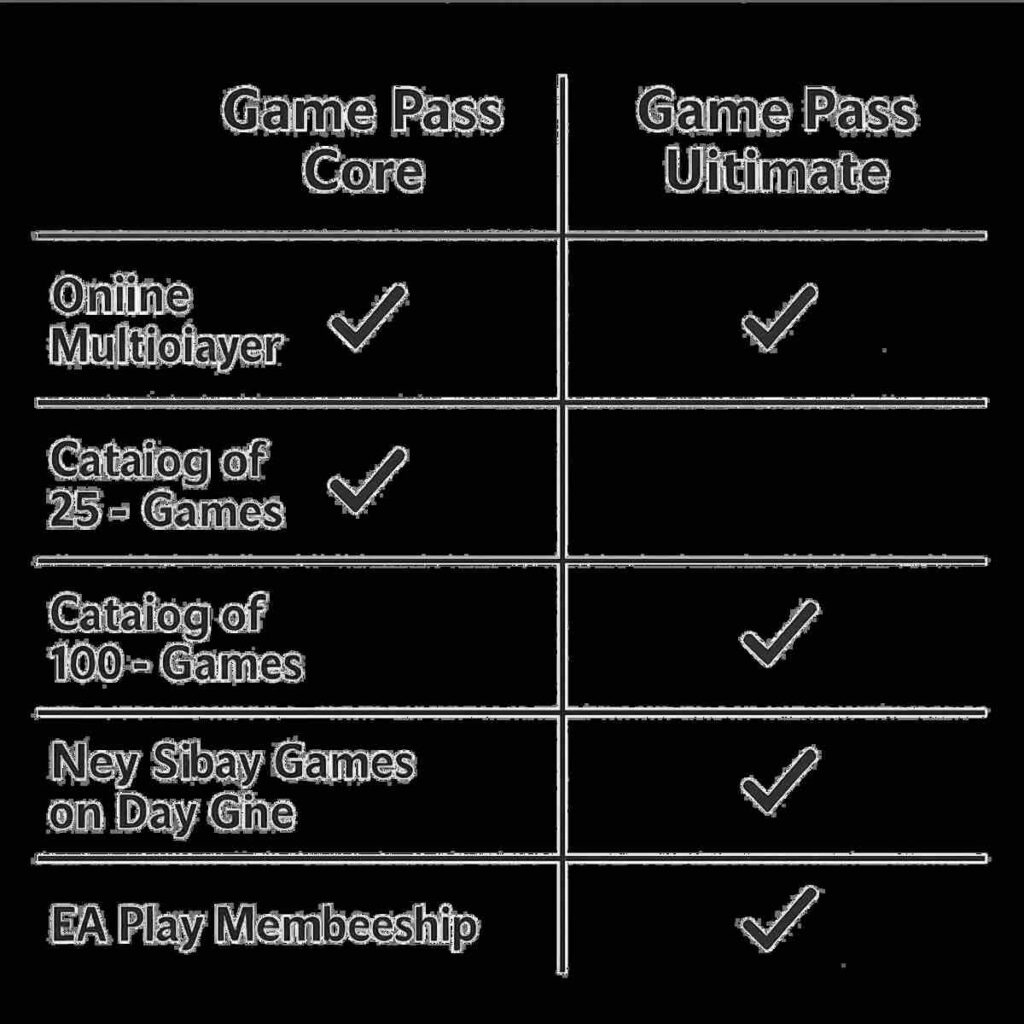
So, the real choice for most people comes down to Game Pass Core vs. Game Pass Ultimate. Think of Game Pass Core as the most direct and cheapest way to get online. If your only goal is to play the paid games you already own—like Call of Duty or EA FC 24—online with friends, Core is all you need. It’s the essential key that unlocks online multiplayer. As a bonus, it also gives you access to a small, curated library of over 25 games.
Stepping up to Xbox Game Pass Ultimate, on the other hand, is like upgrading from a movie ticket to an all-access film festival pass. You get everything included in Core (so your online multiplayer is covered), but it also unlocks the full “Netflix for games” library with hundreds of titles. This includes brand-new Xbox games the day they come out, plus an extra library of games from EA Play. The decision is straightforward: if you just need online access for games you buy, stick with Core. If you love discovering lots of new games and want the best overall package, Ultimate is the winner.
Your Final Checklist: Which Xbox Subscription Should You Get?
The world of Xbox subscriptions doesn’t have to be a confusing maze. To finalize your decision and get playing, simply find the description below that matches you best:
- If you ONLY want to play free games like Fortnite or Warzone… You need: Nothing! It’s completely free.
- If you ONLY want to play ONE paid game online (like Madden or EA FC 24)… You need: Xbox Game Pass Core. This is the key to unlock online multiplayer.
- If you want to play paid games online AND have access to a huge library of hundreds of games… You need: Xbox Game Pass Ultimate. This is the all-in-one package.
By matching your gaming style to the right plan, you can confidently pick the subscription you need without overspending. It’s all about getting the right key for your gaming habits and diving into your next adventure.